
Digital Skills & Tech Mastery Challenge
Your smartphone's been lying to you about how much you actually know.
About This Quest
Master essential digital skills through hands-on challenges that build real tech literacy, from keyboard shortcuts to cybersecurity basics.
Most people use maybe 10% of their device's capabilities. They hunt-and-peck on keyboards, ignore security warnings until it's too late, and treat every tech problem like it needs a professional. This quest changes that. You'll work through 12 practical challenges designed to build genuine digital competence—the kind that saves you hours every week and hundreds of dollars in "tech support" fees. Each challenge takes 30-60 minutes and focuses on one core skill area: keyboard efficiency, file organization systems that actually work, browser productivity, password security, smartphone optimization, basic troubleshooting logic, cloud backup strategies, privacy settings that matter, email management, digital decluttering, screenshot and screen recording techniques, and recognizing common scams. The progression builds on itself—by week three, you'll notice yourself navigating digital spaces with the confidence of someone who actually knows what they're doing. This isn't about becoming a programmer or tech expert. It's about achieving the baseline digital literacy that 2026 demands but most people never formally learn. You'll finish with a personal reference guide of the techniques that work for your specific setup, plus the problem-solving framework to figure out new tech challenges independently.
Why This Quest Matters
You'll stop feeling helpless when something breaks and start recognizing the patterns behind digital problems. By week three, tasks that used to eat 20 minutes—finding files, managing passwords, clearing notifications—will take seconds. You'll have built a personal reference guide of techniques that work for your specific setup, plus the confidence to figure out new tech challenges without calling for help.
What You'll Experience
- Keyboard shortcuts that eliminate hours of mouse-hunting each month
- A troubleshooting framework that works on any tech problem
- Password security practices that actually protect your accounts
- File and email systems that stay organized without constant maintenance
- How to spot phishing attempts and common digital scams before they catch you
What You'll Need
Top gear to make this quest great.
Pull it off
Password Manager Premium
Critical for completing security challenges with features like breach monitoring, secure sharing, and unlimited device syncing
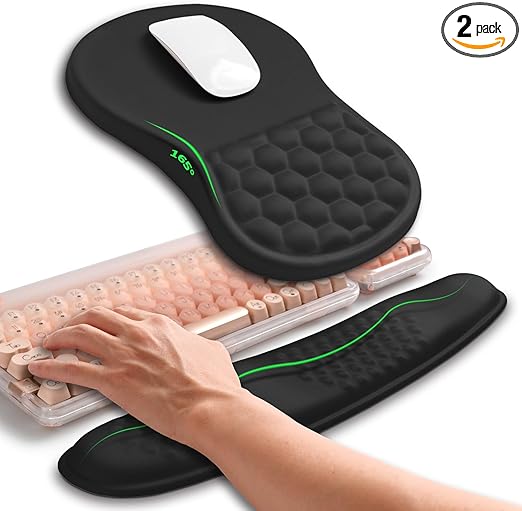
Prevents strain during extended typing practice sessions and makes keyboard shortcut training more comfortable
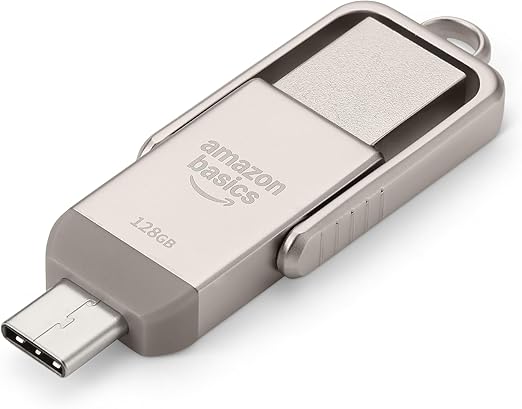
Essential for practicing the 3-2-1 backup strategy and understanding physical data storage beyond cloud solutions
As an Amazon Associate I earn from qualifying purchases. Prices may change.
Step-by-Step Guide
Master keyboard shortcuts and organize files
Spend 20 minutes on keybr.com learning 15 essential shortcuts for your OS until they feel automatic. Then create a logical folder hierarchy for documents, downloads, and photos—clear your desktop completely and implement the 2-minute filing rule.
💡 Pro Tips:
- • Document your baseline typing speed now; you'll want proof of improvement later
- • Name folders by function, not vague categories like 'Stuff' or 'Important'
Transform your browser and lock down passwords
Install a password manager, ad blocker, and tab manager. Learn 10 browser shortcuts and set up organized bookmarks. Then audit your passwords—update your 10 most critical accounts with unique credentials and enable two-factor authentication on email, banking, and social accounts.
💡 Pro Tips:
- • Custom search engines for sites you use daily (type 'yt' + tab in your browser to search YouTube directly)
- • Your password manager should generate passwords you'll never remember—that's the point
Optimize your smartphone and build troubleshooting skills
Kill 80% of push notifications, reorganize your home screen by usage frequency, and delete apps you haven't opened in months. Set up automation rules using Shortcuts or Tasker. Then document and solve 3 tech annoyances you've been tolerating—practice the diagnostic loop of identify, search, implement, document.
💡 Pro Tips:
- • Notifications are designed to be addictive; if you wouldn't walk across the room for it, disable it
Set up bulletproof backups and audit privacy
Implement a 3-2-1 backup strategy for critical files—three copies, two different media types, one offsite—and actually test the restore process. Then audit privacy settings on your five most-used apps, disable unnecessary data collection, and revoke access from services you no longer use.
Achieve email zero and digital declutter
Unsubscribe from 50 email lists, set up filters and labels, then practice the 4 D's (Delete, Delegate, Defer, Do) until you hit inbox zero. Delete duplicate files, clear browser cache, organize cloud storage, and remove old apps—aim to free up at least 10GB of space.
💡 Pro Tips:
- • Most 'newsletters' you subscribed to during a purchase will never be read—be ruthless
Learn visual documentation and scam defense
Master your OS's native screenshot and screen recording tools—practice creating an annotated how-to video. Then study 10 common phishing examples, test yourself on identifying suspicious emails and fake websites, and teach someone less tech-savvy what you learned.
💡 Pro Tips:
- • Screenshots with arrows and highlights solve more problems than paragraphs of text
- • If an email creates urgency about your account, it's probably fake—go directly to the site instead of clicking links
Gear Up for Your Quest
The gear that makes this quest work.
Pull it off

Password Manager Premium
Critical for completing security challenges with features like breach monitoring, secure sharing, and unlimited device syncing
+ complete the kit — 4 more

Ergonomic Wrist Rest
RecommendedPrevents strain during extended typing practice sessions and makes keyboard shortcut training more comfortable
Padded keyboard wrist support with memory foam
Get on Amazon · $34.99 — Ergonomic Wrist Restdetails & deals →
External USB Drive (64GB+)
RecommendedEssential for practicing the 3-2-1 backup strategy and understanding physical data storage beyond cloud solutions
Physical backup drive for local storage
Get on Amazon · $56.99 — External USB Drive (64GB+)details & deals →
Typing Practice Software Premium
OptionalProvides structured lessons and progress tracking for keyboard mastery beyond free tier limitations
Subscription to Keybr, TypingClub, or similar platform
Get on Amazon · $23.99 — Typing Practice Software Premiumdetails & deals →
Screen Cleaning Kit
OptionalPart of digital decluttering—clean screens improve visibility and make screenshot work more professional
Microfiber cloths and screen-safe cleaning solution
Get on Amazon · $9.99 — Screen Cleaning Kitdetails & deals →RELATED GEAR GUIDE
Gamify Your Life Kit: 6 Picks to Turn Days Into Quests
Field-tested picks · Personal Growth
As an Amazon Associate, IRL Sidequests earns from qualifying purchases at no extra cost to you.
Prices and availability are subject to change. The price shown at checkout on Amazon at the time of purchase will apply.
Editor's Picks
Hand-selected quests our team thinks you'll love

Random Side Quest Generator: Complete Guide to Spontaneous Adventures
Turn decision paralysis into roll-the-dice action.

Desk Reset Rituals for Screen Workers
Your screen blur isn't age—it's ritual deficit.

Build Your Domestic Confidence Toolkit
The difference between panicking when something breaks and calmly handling it yourself.