Stop watching coding tutorials. Start building things people can actually use.
Skip the tutorial hell. Build actual working projects you can show employers—starting with zero experience.
You've bookmarked 47 coding courses. You've watched 8 hours of JavaScript tutorials. You still freeze when someone asks, "Can you show me something you've built?" This quest fixes that. Instead of another passive course, you'll build three working projects from scratch: a personal landing page that doesn't look like a 2003 GeoCities page, an interactive budget calculator that actually calculates, and a weather dashboard that pulls live data. No hand-holding through pre-written code. You'll Google error messages, debug broken functions at 11 PM, and feel that specific rush when something finally works. The setup is dead simple: pick one free code editor (VS Code gets recommended because everyone's using it, which means every error message has a Stack Overflow answer), choose one project path (web is easiest to start and show off), and commit to 60-90 minute focused blocks. You're not trying to become a senior engineer. You're proving to yourself—and anyone who asks—that you can take an idea from blank screen to working thing. The portfolio site you build here becomes the place you show the other projects. The whole thing loops back on itself. By week three, you'll have a GitHub profile that doesn't look abandoned and actual URLs you can text to friends.
By week three, you'll have a GitHub profile that doesn't look abandoned and actual URLs you can text to friends. You're proving to yourself—and anyone who asks—that you can take an idea from blank screen to working thing. The portfolio site you build becomes the place you show the other projects, and the whole thing loops back on itself.
Top gear to make this quest great.

Eliminates constant alt-tabbing between code editor and Stack Overflow/documentation. Dramatically speeds up debugging when you can see error messages and solutions side-by-side.

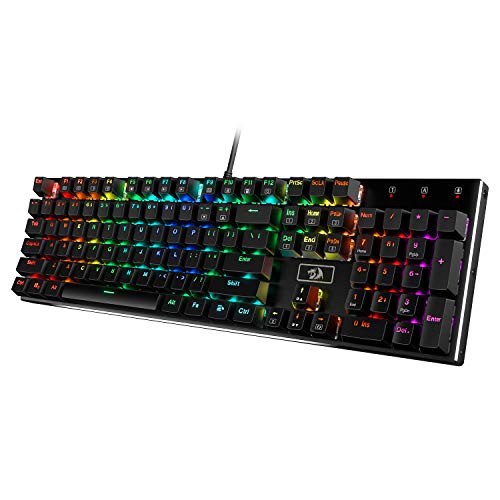
Reduces typos during long coding sessions with physical key feedback. The satisfying click helps you catch mistakes in real-time instead of during runtime errors.

Provides design files and user stories for projects 2 and 3 if you don't want to design from scratch. Acts as training wheels—you still write all code but get professional-looking specs.
As an Amazon Associate I earn from qualifying purchases. Prices may change.
Download VS Code, create a GitHub account, and install Git. Spend 20 minutes clicking around the interface—change themes, open files, break something on purpose to see what error messages look like.
Open a new HTML file and write <h1>Your Name</h1>. Watch it render in your browser—that's your first dopamine hit. Spend 2-3 hours adding about, projects, and contact sections. Use CSS to make it not look like raw HTML. Your layout will break six times. Google 'CSS flexbox not working' and click the purple Stack Overflow links.
Create input fields for income and expenses, then add a button that calculates the difference when clicked. When your function doesn't run, hit F12 to open the browser console and read what broke. Most errors tell you exactly which line failed.
Build a weather dashboard using OpenWeatherMap's free API (1,000 calls per day). You'll hit CORS errors, rate limits, and JSON parsing issues. Document each fix in code comments so you remember how you solved it.
Push your code to GitHub, then deploy your landing page using Netlify or Vercel (both free). Deploy your calculator and weather dashboard separately. Now you have live URLs you can text to people and watch them click around.
Update your landing page with links to your deployed projects and their GitHub repos. Write three sentences per project: what it does, what you learned. Then open your portfolio and explain one project out loud like you're in an interview. Do this three times—the words get less weird each time.
Get everything you need to make this quest amazing.

Eliminates constant alt-tabbing between code editor and Stack Overflow/documentation. Dramatically speeds up debugging when you can see error messages and solutions side-by-side.
External display or tablet mounted as secondary screen for viewing documentation while coding
Get on Amazon · $46.99details & deals →
Reduces typos during long coding sessions with physical key feedback. The satisfying click helps you catch mistakes in real-time instead of during runtime errors.
Keyboard with Cherry MX Brown or equivalent tactile switches for typing feedback
Get on Amazon · $59.99details & deals →
Provides design files and user stories for projects 2 and 3 if you don't want to design from scratch. Acts as training wheels—you still write all code but get professional-looking specs.
Access to structured project tutorials on platforms like Frontend Mentor or Scrimba
Get on Amazon · $12.94details & deals →
Reduces eye strain during 90-minute deep work blocks staring at code. Makes late-night debugging sessions less brutal on your eyes.
Eyewear filtering 400-450nm wavelength light from screens
Get on Amazon · $7.59details & deals →RELATED GEAR GUIDE
Journaling & Habit Kit: 10 Picks That Build the Habit
Field-tested picks · Personal Growth
As an Amazon Associate, IRL Sidequests earns from qualifying purchases at no extra cost to you.
Prices and availability are subject to change. The price shown at checkout on Amazon at the time of purchase will apply.
Hand-selected quests our team thinks you'll love

Turn decision paralysis into roll-the-dice action.

Your screen blur isn't age—it's ritual deficit.

The difference between panicking when something breaks and calmly handling it yourself.