IRL Sidequests
Life's better with a little adventure.
✹ Generator🌅 TodayUrban ExplorationNature & OutdoorsCreative ArtsPersonal GrowthSocial & Community
Remote Work Safari: Map Your City's Best Digital Nomad Spots - Personal Growth quest for Beginner level adventurers

Remote Work Safari: Map Your City's Best Digital Nomad Spots

Turn your city into a remote work laboratory—one WiFi test at a time.

BeginnerPersonal GrowthFamily Friendly
HomePersonal GrowthRemote Work Safari: Map Your City's Best Digital Nomad Spots
Save
Share:
3 supplies needed· Estimated total: $30 - $60
View supplies

About This Quest

Test and rate every coffee shop, coworking space, and hidden work spot in your city. Build your personal remote work field guide.

Remote work isn't about working from anywhere—it's about finding the right anywhere. This quest transforms you into a workspace anthropologist, systematically testing every potential work spot in your city with measurable criteria. You'll download actual files to test speed, time bathroom proximity, count power outlets, measure decibel levels, and document the 3PM energy crash at each location. The best digital nomads don't just show up with a laptop. They know the corner table at the downtown library gets afternoon sun that kills screen visibility. They've timed the lunch rush at five different cafĂ©s to find which one stays quiet. They know which coworking day pass includes the shower access. You'll build this knowledge methodically, creating a scored database of work environments that matches your actual work patterns—not Instagram-worthy aesthetics. This isn't about finding one perfect spot. It's about building a rotation system based on task type, energy level, and time of day. Deep focus work needs different conditions than video calls. Morning writing sessions require different setups than afternoon admin tasks. By the end, you'll have a heat map of your city's work ecosystem, with real data on what works when.

Why This Quest Matters

Remote work freedom means nothing if you're fighting bad WiFi, hunting outlets, or losing focus in the wrong environment. This quest gives you a tested, scored ecosystem of workspaces matched to your actual tasks and rhythms. You'll stop gambling on untested cafés and start engineering your workday around locations you've proven work for specific needs.

What You'll Experience

  • How to measure workspace quality with objective data instead of guessing
  • Which environmental factors actually affect your productivity versus which ones just feel nice
  • A rotation system that matches work types to tested locations and times
  • The hidden patterns of your city's work-friendly spaces across different hours and seasons
  • How to spot workspace red flags before wasting 90 minutes in the wrong spot
Duration
3-4 hours per session
Estimated Cost
$30 - $60
Location
Both
Season
Year-round
Family Friendly
All ages welcome

What You'll Need

Top gear to make this quest great.

Portable WiFi Speed Testing Device or Advanced Network Analyzer App
Portable WiFi Speed Testing Device or Advanced Network Analyzer AppPopular

Phone speed tests can be unreliable due to cellular fallback; this ensures you're testing actual WiFi performance multiple times per location to catch network congestion patterns

$348.00
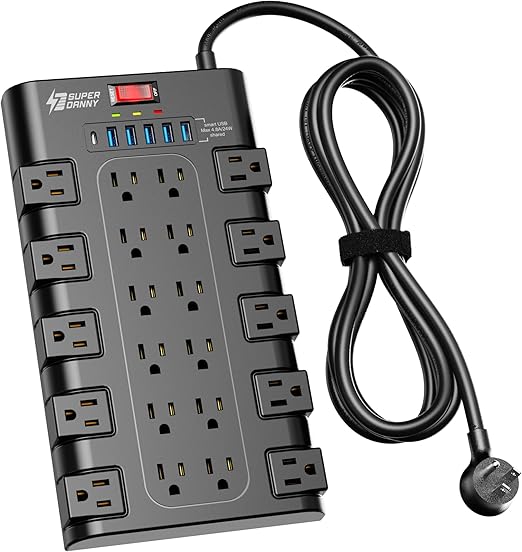
Compact Extension Cord with USB Ports (3-outlet, 6ft)

Turns single inconveniently-placed outlets into workspace solutions; separates you from outlet hoarders and lets you claim spots others can't use effectively

$20.99
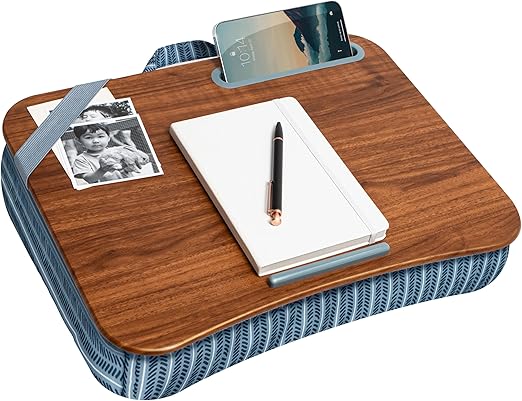
Lap Desk with Device Holder and Cushion

Expands your location options beyond tables—works on couches, outdoor benches, and floor seating; maintains ergonomic posture in non-traditional work spots where others struggle

$29.99

As an Amazon Associate I earn from qualifying purchases. Prices may change.

Step-by-Step Guide

1

Design your workspace scoring system

Build a weighted rubric with measurable criteria: WiFi speed (three timed tests), power outlets per 100 square feet, decibel readings during peak hours, seating comfort for multi-hour sessions, bathroom proximity, food costs, natural light quality, temperature consistency, and your personal 'weird vibe' assessment. Weight each factor based on what actually affects your work output.

💡 Pro Tips:

  • ‱ Download a decibel meter app and test during the hours you'd actually work there
  • ‱ Rate outlets by accessibility—a single outlet behind a display case scores lower than four under every table
2

Map 10-15 locations across price tiers

Scout diverse spots in different neighborhoods: free public libraries, budget coffee shops, sit-down cafés with food menus, premium coworking day passes, hotel lobbies that tolerate laptop workers, university libraries during non-exam periods, bookstore cafés, and one wildcard location like a bowling alley bar on weekday afternoons. Cover the full spectrum from zero-cost to splurge.

💡 Pro Tips:

  • ‱ Include at least two spots you'd normally dismiss as too weird—they often become your secret weapons
3

Test each spot during real work hours

Spend 90+ minutes at each location doing actual work, not browsing. Run speed tests at :15 and :45 past the hour to catch network fluctuations. Track completed tasks, not mood. Note staff reactions after three hours, identify which tables wobble, observe bathroom line patterns, watch for afternoon glare shifts, and clock when music genres change or regulars claim territory.

💡 Pro Tips:

  • ‱ Bring a task you know takes 45 minutes—if it takes 90, the environment is sabotaging you
  • ‱ Test on the same weekday for consistency, then revisit your top spots on different days
4

Document the invisible details

Record the specifics that separate good sessions from ruined ones: which seats get 4PM sun glare, temperature differences between sections, how long before staff expects another purchase, the bathroom code system, where the lunch rush line forms at 11:30, and which corner stays quiet all day. Take photos of outlet locations and note table numbers.

5

Match locations to work types

Build a rotation schedule assigning your top spots to specific tasks and times. Route deep focus work to the silent library corner at 9AM, schedule client calls from the coworking phone booth in the afternoon, tackle admin during the 3PM energy dip at a buzzy café that keeps you alert, and reserve the strange art gallery counter for creative thinking when you need stimulation.

💡 Pro Tips:

  • ‱ Your rotation isn't about variety for its own sake—it's about engineering the right conditions for different cognitive demands
6

Create and maintain your database

Build a shareable workspace map using Google Maps custom pins, Notion, or Airtable with scores, outlet photos, and hyperspecific notes like 'Table 7 only, weekdays before noon, bathroom code is WiFi password reversed.' Revisit your top three monthly to catch ownership changes, policy shifts, seasonal crowd patterns, and temperature variations that make winter corners unbearable or summer tourist floods.

Full gear guide
Journaling & Habit Kit: 10 Picks That Build the Habit
See all picks →

Gear Up for Your Quest

Get everything you need to make this quest amazing.

Portable WiFi Speed Testing Device or Advanced Network Analyzer App

Portable WiFi Speed Testing Device or Advanced Network Analyzer App

EssentialPopular
$348.00
★★★★3.9 (17)

Phone speed tests can be unreliable due to cellular fallback; this ensures you're testing actual WiFi performance multiple times per location to catch network congestion patterns

Tool for measuring download/upload speeds, latency, and network stability across multiple tests

Get on Amazon · $348.00details & deals →

Decibel Meter App with Data Logging

Decibel Meter App with Data Logging

Essential
$0-5

Quantifies the actual noise environment beyond subjective 'feels loud'—critical for comparing locations and identifying when spaces hit your personal noise threshold for focus work

Smartphone app that measures ambient noise levels in dB and tracks changes over time


Compact Extension Cord with USB Ports (3-outlet, 6ft)

Compact Extension Cord with USB Ports (3-outlet, 6ft)

Recommended
$20.99
★★★★★4.8 (12,016)

Turns single inconveniently-placed outlets into workspace solutions; separates you from outlet hoarders and lets you claim spots others can't use effectively

Short extension cord with multiple outlet types and built-in USB charging

Get on Amazon · $20.99details & deals →

Offline Mapping and Note-Taking System

Offline Mapping and Note-Taking System

Recommended
$0-10

Centralizes your workspace intelligence with GPS tags, photos, and searchable notes; makes your research actionable and shareable rather than scattered in random phone notes

Google Maps custom map builder or similar offline-capable location database tool


Lap Desk with Device Holder and Cushion

Lap Desk with Device Holder and Cushion

Optional
$29.99
★★★★★4.7 (17,977)

Expands your location options beyond tables—works on couches, outdoor benches, and floor seating; maintains ergonomic posture in non-traditional work spots where others struggle

Portable desk surface with built-in phone/tablet slot and ergonomic padding

Get on Amazon · $29.99details & deals →

RELATED GEAR GUIDE

Journaling & Habit Kit: 10 Picks That Build the Habit

Field-tested picks · Personal Growth

As an Amazon Associate, IRL Sidequests earns from qualifying purchases at no extra cost to you.

Prices and availability are subject to change. The price shown at checkout on Amazon at the time of purchase will apply.

Tags

mindfulnessproductivitydigital-lifestyleurban-mappingself-improvement

Editor's Picks

Hand-selected quests our team thinks you'll love

Random Side Quest Generator: Complete Guide to Spontaneous Adventures - Personal Growth quest
Trending

Random Side Quest Generator: Complete Guide to Spontaneous Adventures

Turn decision paralysis into roll-the-dice action.

BeginnerPersonal Growth
15-30 minutes per quest
$
Both
View Quest
Desk Reset Rituals for Screen Workers - Personal Growth quest
Trending

Desk Reset Rituals for Screen Workers

Your screen blur isn't age—it's ritual deficit.

BeginnerPersonal Growth
15-30 minutes
Free
Indoor
View Quest
Build Your Domestic Confidence Toolkit - Personal Growth quest
Trending

Build Your Domestic Confidence Toolkit

The difference between panicking when something breaks and calmly handling it yourself.

BeginnerPersonal Growth
2-4 hours per skill
$$$
Indoor
View Quest
IRL Sidequests

Real-world adventures, activities, and experiences.

Categories

  • Urban Exploration
  • Nature & Outdoors
  • Creative Arts
  • Personal Growth
  • Social & Community

Gear Guides

  • Urbex Gear & Kit
  • Bird Watching Kit
  • Day Hike Gear
  • Phone Photography Gear
  • Journaling Gear
  • All gear guides →

Explore

  • Side Quest Generator
  • Today's Side Quest
  • Gear Deals
  • Idea Lists
  • About & Policies

Get the weekly quest drop

© 2026 IRL Sidequests. Life's better with a little adventure.
3 supplies · $30 - $60
Shop on Amazon