Stop fighting your softwareâlearn the workflow that lets you draw faster and cleaner.
Build a professional digital art workflow from sketch to polish using modern tools, shortcuts, and layer management techniques that working illustrators actually use.
Most people learning digital art waste hours backtracking, fixing layers, or hunting for tools because nobody teaches workflowâjust techniques. This quest changes that. You'll set up a canvas template with proper resolution and color profiles, create a custom brush set optimized for your style, and practice the layer-stacking method that professional illustrators use to keep files organized and editable. By the end, you'll have keyboard shortcuts mapped to your dominant hand, reference boards loaded in a second monitor or tablet, and a reusable file structure that works for everything from character sketches to full illustrations. The difference between hobbyist and professional digital art isn't talentâit's efficiency. You'll learn non-destructive editing with clipping masks and adjustment layers, so you can change colors or lighting without starting over. You'll practice the 'rough-refine-polish' method with separate passes, keeping early sketches intact while you tighten details. Most importantly, you'll build muscle memory for the shortcuts and gestures that let you stay in flow instead of fumbling through menus. This isn't about learning one more brush packâit's about structuring your process so every session moves faster than the last.
Professional digital artists don't draw betterâthey draw smarter. Once your workspace is dialed in and muscle memory takes over your shortcuts, you'll spend entire sessions in unbroken flow instead of hunting through menus. The template you build becomes a launchpad that cuts hours of setup from every future project.
Top gear to make this quest great.

Essential for natural line variation and brush controlâmouse drawing feels robotic and slows you down significantly. The pressure sensitivity lets you vary line weight intuitively, which is how professionals get expressive strokes without constantly adjusting brush size settings.

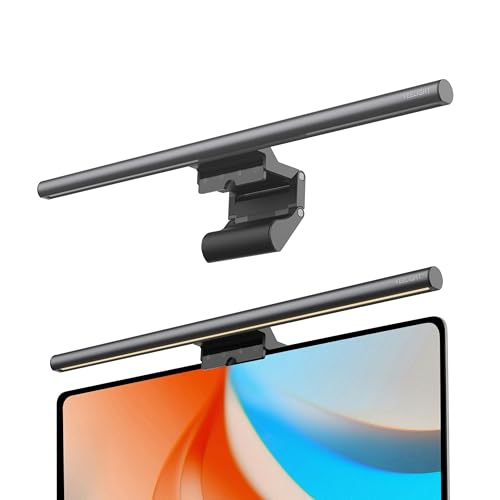
Eliminates eye strain during long sessions by providing even lighting on your reference materials and keyboard without reflecting on your screen. Serious quality-of-life upgrade for anyone working 2+ hour sessionsâreduces headaches and lets you match colors more accurately.

Lets you draw at a natural wrist angle instead of flat on the desk, reducing strain and improving line control. The ergonomic difference is massive for longer sessionsâyour shoulder and wrist will thank you after hour two.
As an Amazon Associate I earn from qualifying purchases. Prices may change.
Create a 300 DPI canvas at 3000x3000px (RGB for screen, CMYK for print). Mount your tablet stand at eye level and load reference images on a second deviceâPinterest, PureRef, or ArtStationâso you never tab away mid-stroke. Position your monitor light bar to eliminate glare; use 6500K for linework, 2700K for color painting.
Download a free pack (Kyle T. Webster for Photoshop, David Revoy for Krita, or Procreate natives) and ruthlessly delete brushes you don't immediately love. Keep 8-10 max, organized into folders: sketching, inking, shading, texture. Assign your top 3 to tablet shortcut keys for one-press access.
Assign eyedropper, eraser, transform, and undo to keys reachable without moving your off hand from home position. Program remaining tablet buttons for layer controls and canvas rotation. Write all mappings on a sticky note stuck to your monitorâyou'll memorize them within three sessions.
Draw a simple objectâcoffee mug, houseplantâusing separate layers for rough sketch at 20% opacity, clean linework, base colors, shadows, and highlights. Label every layer clearly. Create a clipping mask for shading so it only affects the base color layer below, making edits reversible.
Draw a character bust from a reference photo displayed on your mounted device. Work in stages: 5-minute thumbnail, rough sketch, clean lines, flat colors, then two shading passes (soft shadows with pressure, hard highlights with tilt). Time each stage and note where you slow downâthat's your next drilling target.
Export your canvas with layer structure intact, brushes loaded, color swatches organized, and shortcuts documented in the file notes. Every new project starts from this template, eliminating setup time and decision fatigue.
Get everything you need to make this quest amazing.

Essential for natural line variation and brush controlâmouse drawing feels robotic and slows you down significantly. The pressure sensitivity lets you vary line weight intuitively, which is how professionals get expressive strokes without constantly adjusting brush size settings.
Graphics tablet with at least 4096 pressure levels and customizable express keys
Get on Amazon ¡ $29.99details & deals âIndustry-standard software that supports non-destructive workflows, custom shortcuts, and brush engines. Krita is genuinely professional-grade and free, making it the best entry point before committing to subscription costs.
Professional illustration software with layer support and custom brushes (Krita is free and open-source, Photoshop is $10-20/month)

Eliminates eye strain during long sessions by providing even lighting on your reference materials and keyboard without reflecting on your screen. Serious quality-of-life upgrade for anyone working 2+ hour sessionsâreduces headaches and lets you match colors more accurately.
Asymmetric monitor lamp that lights your workspace without screen glare
Get on Amazon ¡ $25.99details & deals â
Lets you draw at a natural wrist angle instead of flat on the desk, reducing strain and improving line control. The ergonomic difference is massive for longer sessionsâyour shoulder and wrist will thank you after hour two.
Articulating arm or angled stand that positions your drawing tablet at a natural angle
Get on Amazon ¡ $23.73details & deals âRELATED GEAR GUIDE
Phone Photography Kit: 9 Picks for Better Shots
Field-tested picks ¡ Creative Arts
As an Amazon Associate, IRL Sidequests earns from qualifying purchases at no extra cost to you.
Prices and availability are subject to change. The price shown at checkout on Amazon at the time of purchase will apply.
Hand-selected quests our team thinks you'll love

Wake up with the birds and see your neighborhood through new eyes.

The best way to learn creative skills? Make bad art until it gets good.

Your hands built the first bowls 20,000 years ago. They still can.